Writing Array Elements
In this lesson, we will look at how to change array element values, what happens when writing by index, and how to protect against errors.
Writing array elements
To change an array element, you need to access it by index and assign a new value.
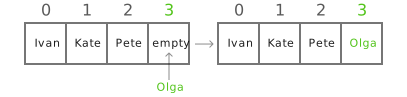
Let's continue the movie theater row analogy. We have an array of seats:
- Seat 1 (index 0) - Ivan
- Seat 2 (index 1) - Kate
- Seat 3 (index 2) - Pete
- Seat 4 (index 3) - empty
If a new person sits in seat 4, we can write to the array element at index 3:
Preview
Now the array is: ["Ivan", "Kate", "Pete", "Olga"]
Changing array elements
Suppose Kate and Ivan decided to swap seats
Writing to a non-existent index
As with reading, if you try to write a value to an index that does not exist in the array, an
IndexOutOfRangeException will occur.
Preview
The array does not expand when writing — its size is fixed.
How to check an index before writing
To avoid an error, you can check whether the index falls within the valid bounds.
Summary
In this lesson you learned:
- how to write values to array elements
- that writing happens by index, just like reading
- what happens when trying to write to an invalid index
- how to check the index to avoid errors
Exercises
- Change the third element of the array to "Orange"
- Swap the first and last elements of the array.
- Try to change elements with index 4 and index -1. What will happen? Why?
- Write a method WriteFruit(int index, string value) that writes a value to the array only if the index is valid; otherwise prints the message "Invalid index!"